Bank fee
- Bank
- FEE-006 · −18.00 EUR
- Books
- 627 · −15.00 EUR
- Result
- Difference 3.00 EUR
The bank charged more than the books expected. Record the extra fee or ask the bank. The match waits until you decide.
! Needs a decision
Bank statements, matched to the books
Import your statements, review the matches the desk proposes, each with its reason, and resolve what is left before it reaches the ledger.
Bank access runs through a regulated account information service provider (AISP), agreed per project. Setup starts with your statement files.
| Value date | Details | Reference | Amount (EUR) | Balance (EUR) | Proposed document | Reason |
|---|---|---|---|---|---|---|
| 01.10 | Opening balance | 8,000.00 | ||||
| 04.10 | Own-account transfer | TRF-0410 | −2,000.00 | 6,000.00 | Waiting for the USD statement | Set aside |
| 05.10 | Card settlement | CARD-0510 | +312.40 | 6,312.40 | Rule R-03 · Card settlements → 5125 Amounts in settlement · 312.40 | Rule |
| 05.10 | Customer receipt, partial | INV-1039 | +500.00 | 6,812.40 | INV-1039 · Invoice 1,200.00 · remaining 700.00 | Allocated in part |
| 06.10 | Customer receipt | INV-1042 | +1,240.00 | 8,052.40 | INV-1042 · Invoice, due 05.10 · 1,240.00 | Reference |
| 06.10 | Supplier payment | none | −426.50 | 7,625.90 | BILL-211 · Supplier bill, same amount, dated 04.10 · 426.50 | Amount + date |
| 06.10 | Account service fee | FEE-006 | −18.00 | 7,607.90 | 627 · Bank charges, Oct · ledger −15.00 · Difference 3.00 EUR | Needs review |
| 06.10 | Closing balance | 7,607.90 |
3 matched · 1 allocated in part · 1 to review · 1 set aside
The matching desk
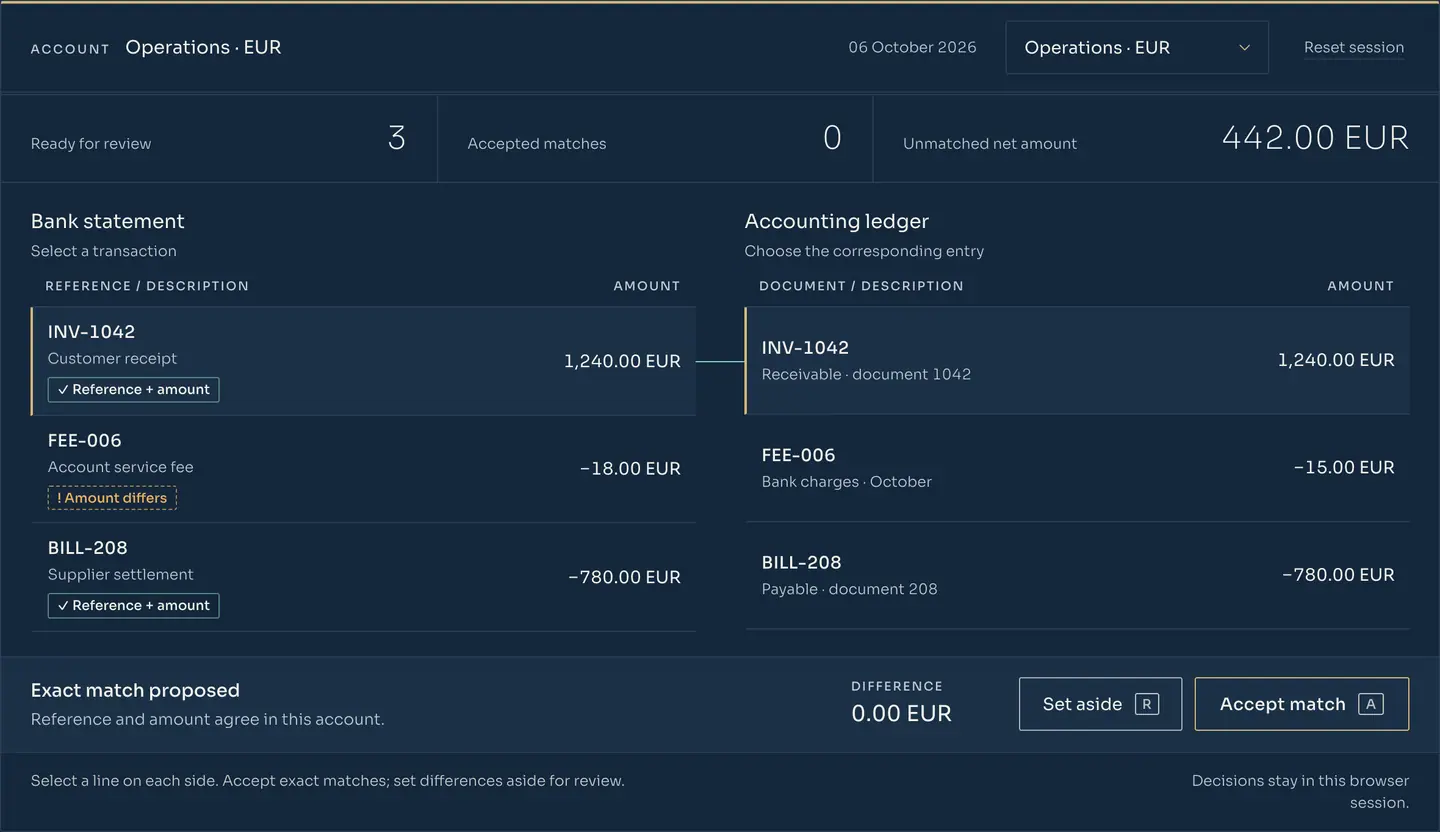
Select a statement line on the left and its accounting entry on the right. Exact matches can be accepted. A difference is set aside with a note. Nothing you do here leaves this browser.
Select a transaction
Choose the corresponding entry
Select a line on each side. Accept exact matches; set differences aside for review.
Decisions stay in this browser session.Things to try
The browser desk changes no bank or ledger records. In the product, the same decisions are kept in the decision log.
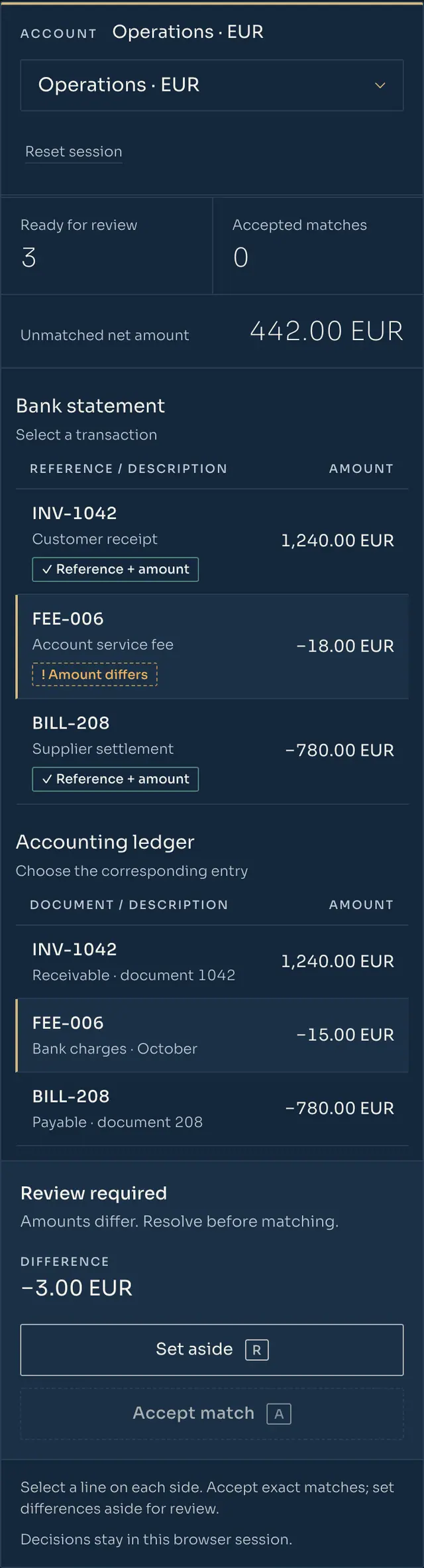
The desk never matches silently. Each proposed pair names its method (reference, amount and date, rule or manual), so the person accepting it checks the logic in seconds and an auditor can check it a year later.
The payment details carry the invoice number, and the amount agrees.
Example: INV-1042 · 1,240.00 = 1,240.00
No reference, but one open document has the same amount and counterparty within the agreed date window.
Example: — · −426.50 → BILL-211 · ±3 days
A recurring movement follows a rule you approved: card settlements, standing fees, salaries.
Example: R-03 · Card settlements
A person paired it and wrote why. The note stays with the match.
Example: Note: “grouped payment, 3 invoices”
Most of month-end goes on a handful of lines. Each one waits here with the amount that is missing and the decision someone has to make, so nothing is settled in a side spreadsheet.
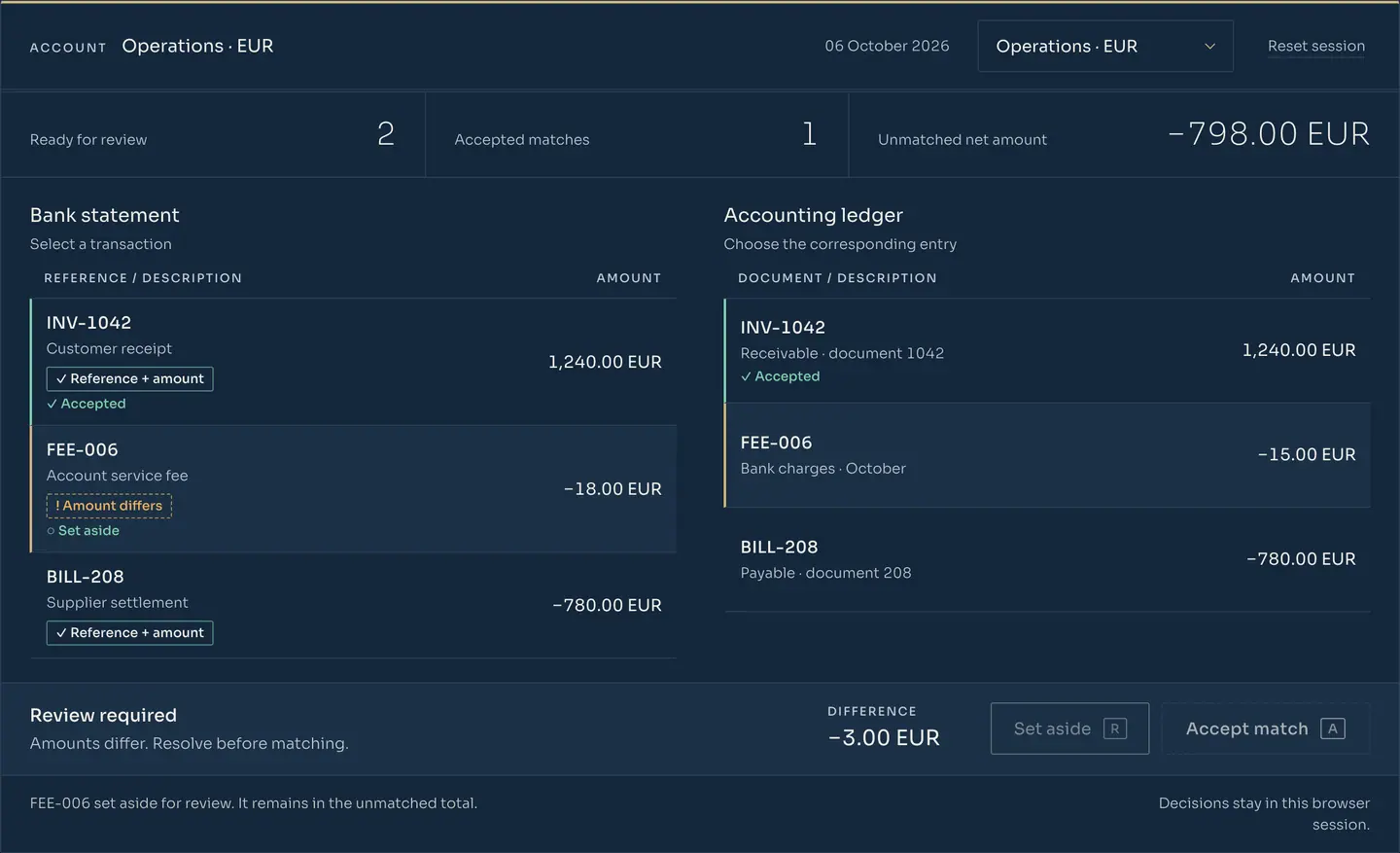
The bank charged more than the books expected. Record the extra fee or ask the bank. The match waits until you decide.
A customer paid part of an invoice, or one transfer covers several invoices. Allocate it explicitly and keep the remaining balance visible.
Money left one account and has not shown up in the other yet. Set it aside with a note; it returns to the queue when the next statement arrives.
The same statement loaded twice should not create twice the work. Lines already imported are recognised by their bank reference, so two genuine payments of the same amount stay separate.
In · formats we assess during scoping
Out · where accepted decisions go in RDCopilot
Banking proposes, your team reviews, the roles you name approve.
A format is confirmed only after we have tested a real export from your bank. If your accounting system is not an RDCopilot product, the handoff is an export file or an integration agreed in the scope.
We do not publish a list of banks, because each one is confirmed for your accounts before go-live: the bank, the country, the account type and the fields its export carries. This is what a scope usually covers.
Each client company keeps its own books, its own banks and its own queue. Your team switches between clients from one place, and each client’s rules and rights stay separate. Read-only access for a client to its own decision log can be agreed in the scope.
Client separation, user rights and read-only access are agreed in the scope.
| Time | Action | Line | Reason / note | Who |
|---|---|---|---|---|
| Accepted | INV-1042 | Reference + amount | AccountantWorks the queue every day: accepts proposed matches, allocates partial payments, sets aside what needs a document. | |
| Accepted | CARD-0510 | Rule R-03 · card settlement | Accountant | |
| Accepted | BILL-211 | Amount + date, no reference | Accountant | |
| Asked the bank | FEE-006 | Difference 3.00 EUR · still to review | Accountant | |
| Allocated | INV-1039 | 500.00 of 1,200.00 | Accountant | |
| Approved export | Batch 06.10 | 4 lines | Finance leadApproves the export before it reaches the ledger, signs off the month and owns the rules. | |
| Viewed | Batch 06.10 | Read only | AuditorReads, never edits: who accepted which line, on what reason, and when. |
| Date | Debit | Credit | Amount | Source |
|---|---|---|---|---|
| 06.10 | 5124 | 4111 | 1,240.00 EUR | INV-1042 |
| 05.10 | 5124 | 5125 | 312.40 EUR | CARD-0510 (rule R-03) |
| 06.10 | 401 | 5124 | 426.50 EUR | BILL-211 |
| 05.10 | 5124 | 4111 | 500.00 EUR | INV-1039 (partial) |
Automatic bank data goes through an account information service provider authorised or registered under PSD2, agreed with you per project. Until then, statement files do the same job.
Access needs your explicit consent and covers only the accounts you designate. Under EU rules your bank asks you to re-confirm it with strong authentication at least every 180 days. You can withdraw it at any time.
Statement data, decisions and the log are kept in the EU. Retention, access and deletion at the end are set in a data processing agreement before the first import, in line with the accounting retention rules of your country.
Banking reads statement and account information to reconcile it. Account information access is read-only by law: it cannot initiate payments or change anything at the bank.
R&D COPILOT provides the software and the integration. Transaction history and access periods differ from bank to bank, so each connection is confirmed in writing before go-live.
The duration depends on your accounts and banks, and is set in the quote.
We list your accounts, banks and currencies and test one real export from each bank.
We write the matching rules with your accountant and import a closed month as a test.
Your team reconciles a current month in Banking and the old way side by side.
We agree the export, roles and approvals, and the finance lead signs off the first month.
Updates, hosting and support. Rules are reviewed when your banks or accounts change.
Quoted per project
Quoted per project
Both are quoted after scoping and depend on your accounts, banks and how decisions reach your accounting. Provider access for automatic bank data, if you choose that route, is quoted separately.
Request a quoteNot here? Ask us directly
We assess the exports your banks already produce, typically MT940, its ISO 20022 successor camt.053, CSV or XLSX. A format is confirmed only after we import a real file from your bank during scoping, because two banks can fill the same format differently.
Automatic bank data goes through an account information service provider authorised or registered under PSD2, chosen and agreed per project. We confirm each bank, account and data field before go-live. If you prefer, Banking works entirely from statement files.
No. The desk proposes matches with a reason. A person accepts them, and the export to accounting is approved by the roles you name. Nothing reaches the ledger without that approval.
The line is allocated explicitly: part to one invoice, or split across several. The remaining balance stays visible on the invoice, and the allocation is kept in the decision log.
Each account (for example EUR and USD) keeps its own currency and its own queue, so decisions never mix currencies. You review all accounts from one place, as you can try in the desk above.
Yes. Accepted decisions leave as an export file or through an integration agreed in the scope. Invoice numbers from your invoicing tool, including, for companies operating in Romania, those issued through RO e‑Factura, can serve as matching references.
In the EU. The retention period, who can see which accounts and how data is returned or deleted at the end are set in a data processing agreement before the first import.
With a scoping call about your accounts, banks and accounting system. You then receive a quote for a one-off setup and a monthly licence. Support is available in English and Romanian.
Tell us which accounts and which accounting workflow you need to bring together. We will come back with the formats, the access route and a quote for setup and licence.
Access starts after scoping and a signed agreement.
From idea to implementation
Import supported bank statements, preserve original rows and review explainable transaction matches with visible exceptions, source checks and finance approval.
Read guidePrevent repeated bank imports from creating duplicate work while preserving legitimate equal-valued payments, original source rows and finance review decisions.
Read guideReview partial payments, grouped settlements and fees through explicit allocations, supporting evidence and remaining balances the accountant can inspect.
Read guide© 2026 R&D COPILOT Made in EU Contact form